

Appearance
命令行
¥Command Line
Meteor 工具的各种命令行选项的文档。
¥Documentation of the various command line options of the Meteor tool.
以下是 meteor 命令行工具中一些更常用的命令。这只是一个概述,并没有提到每个命令或每个命令的每个选项;有关更多详细信息,请使用 meteor help 命令。
¥The following are some of the more commonly used commands in the meteor command-line tool. This is just an overview and does not mention every command or every option to every command; for more details, use the meteor help command.
meteor 帮助
¥meteor help
获取有关 Meteor 命令行用法的帮助。
¥Get help on meteor command line usage.
bash
meteor help列出常用的 Meteor 命令。
¥Lists the common meteor commands.
bash
meteor help <command>打印特定命令的详细帮助信息。
¥Prints detailed help about the specific command.
meteor 运行
¥meteor run
在当前项目中运行 Meteor 开发服务器。
¥Run a meteor development server in the current project.
bash
meteor run提示
这是默认命令。只需运行 meteor 即可与 meteor run 相同。
¥This is the default command. Simply running meteor is the same as meteor run.
功能
¥Features
自动检测并将更改应用于应用的源文件
¥Automatically detects and applies changes to your application's source files
无需网络连接
¥No Internet connection required
默认访问 localhost:3000 处的应用
¥Accesses the application at localhost:3000 by default
从当前目录向上搜索 Meteor 项目的根目录。
¥Searches upward from the current directory for the root directory of a Meteor project
选项
¥Options
| 选项 | 描述 |
|---|---|
--port, -p <port> | 监听端口(默认值:3000)。同时使用端口 N+1 和 --app-port 指定的端口。指定 --port=host:port 以绑定到特定接口 |
--open, -o | 应用启动时打开浏览器窗口 |
--inspect[-brk][=<port>] | 通过调试客户端启用服务器端调试。使用 --inspect-brk 选项,启动时暂停(默认端口:9229) |
--mobile-server <url> | 移动构建的连接位置(默认为本地 IP 和端口)。可以包含 URL 方案(例如 https://example.com:443) |
--cordova-server-port <port> | Cordova 提供内容的本地端口 |
--production | 模拟生产模式。压缩并打包 CSS 和 JS 文件 |
--raw-logs | 不解析 stdout 和 stderr 中的日志(默认值:true) |
--timestamps | 在日志中包含时间戳,与传递 --raw-logs=false 的效果相同。 |
--settings, -s <file> | 设置服务器上 Meteor.settings 的可选数据 |
--release <version> | 指定要使用的 Meteor 版本 |
--verbose | 打印构建日志的所有输出 |
--no-lint | 不要在每次重建时运行应用使用的 linters |
--no-release-check | 不要运行版本更新程序来检查新版本 |
--allow-incompatible-update | 允许将软件包升级或降级到可能不兼容的版本 |
--extra-packages <packages> | 使用其他软件包运行(以逗号分隔,例如 "package-name1, package-name2@1.2.3") |
--exclude-archs <archs> | 不要为某些 Web 架构创建 bundle(以逗号分隔,例如 "web.browser.legacy, web.cordova") |
Node.js 选项
¥Node.js Options
要将其他选项传递给 Node.js,请使用 SERVER_NODE_OPTIONS 环境变量:
¥To pass additional options to Node.js, use the SERVER_NODE_OPTIONS environment variable:
Windows PowerShell:
powershell
$env:SERVER_NODE_OPTIONS = '--inspect' | meteor runLinux/macOS:
bash
SERVER_NODE_OPTIONS=--inspect-brk meteor run端口配置示例
¥Port Configuration Example
bash
meteor run --port 4000此命令:
¥This command:
在
http://localhost:4000上运行开发服务器¥Runs the development server on
http://localhost:4000在
mongodb://localhost:4001上运行 MongoDB 开发实例¥Runs the development MongoDB instance on
mongodb://localhost:4001
信息
开发服务器始终使用端口 N+1 作为默认 MongoDB 实例,其中 N 是应用端口。
¥The development server always uses port N+1 for the default MongoDB instance, where N is the application port.
meteor 调试
¥meteor debug
运行项目并暂停服务器进程进行调试。
¥Run the project with the server process suspended for debugging.
弃用通知
meteor debug 命令已被更灵活的 --inspect 和 --inspect-brk 命令行标志取代,它们可与 run、test 和 test-packages 命令配合使用。
¥The meteor debug command has been superseded by the more flexible --inspect and --inspect-brk command-line flags, which work with run, test, and test-packages commands.
现代调试方法
¥Modern Debugging Approach
bash
# Debug server with auto-attachment
meteor run --inspect

# Debug server and pause at start
meteor run --inspect-brk
命令用法
¥Command Usage
bash
meteor debug [--debug-port <port>]工作原理
¥How It Works
服务器进程在服务器代码执行的第一条语句之前暂停。
¥Server process suspends just before the first statement of server code execution
调试器默认监听端口 5858 上的传入连接
¥Debugger listens for incoming connections on port 5858 by default
使用
--debug-port <port>指定其他端口¥Use
--debug-port <port>to specify a different port
设置断点
¥Setting Breakpoints
在代码中使用
debugger关键字¥Use the
debuggerkeyword in your code通过调试客户端的 UI 设置断点(例如,在 "来源" 选项卡中)
¥Set breakpoints through the debugging client's UI (e.g., in the "Sources" tab)
调试客户端
¥Debugging Clients
你可以使用以下任一方式:
¥You can use either:
基于 Web 的节点检查器
¥Web-based Node Inspector
命令行调试器
¥Command-line debugger
节点检查器控制台 Bug
由于 node-inspector 中的错误 错误,在 Node Inspector 控制台中执行命令后按下 "输入" 键可能无法成功将命令发送到服务器。
¥Due to a bug in node-inspector, pressing "Enter" after a command in the Node Inspector Console may not successfully send the command to the server.
解决方法:
¥Workarounds:
使用 Safari 浏览器
¥Use Safari browser
使用
meteor shell与服务器控制台交互¥Use
meteor shellto interact with the server console应用 此评论 中提供的热补丁
¥Apply the hot-patch available in this comment
与 Node.js 标志的区别
¥Differences from Node.js Flags
Meteor --inspect 和 --inspect-brk 标志的工作方式与 Node.js 标志类似,但有两个主要区别:
¥The Meteor --inspect and --inspect-brk flags work similarly to Node.js flags with two key differences:
它们会影响构建过程生成的服务器进程,而不是构建过程本身。
¥They affect the server process spawned by the build process, not the build process itself
--inspect-brk标志会在服务器代码加载完成后、开始执行前暂停执行。¥The
--inspect-brkflag pauses execution after server code has loaded but before it begins to execute
替代方法
¥Alternative Approach
可以通过将 --debug-port <port> 选项添加到其他 Meteor 命令来实现相同的调试功能:
¥The same debugging functionality can be achieved by adding the --debug-port <port> option to other Meteor commands:
bash
meteor run --debug-port 5858
meteor test-packages --debug-port 5858
meteor 配置文件
¥meteor profile
为你的 Meteor 应用运行性能配置文件,以分析构建和打包性能。
¥Run a performance profile for your Meteor application to analyze build and bundling performance.
bash
meteor profile [<meteor-run-options>...]可用性
此命令适用于 Meteor 3.2 及更高版本。
¥This command is available from Meteor 3.2 and newer.
用法
¥Usage
此命令监控打包器进程并跟踪关键性能指标,以帮助分析构建和打包性能。
¥This command monitors the bundler process and tracks key performance metrics to help analyze build and bundling performance.
选项
¥Options
| 选项 | 描述 |
|---|---|
--size | 同时监控 bundle 的运行时和大小 |
--size-only | 仅监控 bundle 的大小 |
--build | 监控构建时间 |
信息
meteor run 的所有其他选项也受支持(例如 --settings、--exclude-archs)。如果你使用 --build 选项,它还会接受 meteor 构建标志(例如 --mobile-settings、--architecture)。
¥All other options from meteor run are also supported (e.g., --settings, --exclude-archs). If you use the --build option, it also accepts meteor build flags (e.g. --mobile-settings, --architecture).
环境变量
¥Environment Variables
| 变量 | 描述 | 默认 |
|---|---|---|
METEOR_IDLE_TIMEOUT=<seconds> | 设置分析超时时间 | 90 秒 |
METEOR_CLIENT_ENTRYPOINT=<path> | 设置自定义客户端入口点 | 来自 package.json |
METEOR_SERVER_ENTRYPOINT=<path> | 设置自定义服务器入口点 | 来自 package.json |
METEOR_LOG_DIR=<path> | 设置自定义日志目录 | 默认日志目录 |
提示
默认超时时间(90 秒)通常足以完成每个构建步骤。如果你遇到由于提前退出而导致的错误,请增加 METEOR_IDLE_TIMEOUT 的值。
¥The default timeout (90s) is usually enough for each build step to complete. If you encounter errors due to early exits, increase the METEOR_IDLE_TIMEOUT value.
示例用法
¥Example Usage
bash
# Basic profile
meteor profile

# Monitor bundle size only
meteor profile --size-only

# Monitor build time
meteor profile --build

# Profile with custom settings and timeout
METEOR_IDLE_TIMEOUT=120 meteor profile --settings settings.json

# Profile with custom entrypoints
METEOR_CLIENT_ENTRYPOINT=client/main.js METEOR_SERVER_ENTRYPOINT=server/main.js meteor profile
自定义分析过程
你可以传递任何与 meteor run 兼容的选项来自定义分析过程。这允许你在与你的部署环境匹配的特定条件下分析你的应用。--build 选项也是如此,它与 meteor build 选项匹配。
¥You can pass any option that works with meteor run to customize the profiling process. This allows you to profile your application under specific conditions that match your deployment environment. The same applies to the --build option, which matches meteor build options.
meteor 创建应用名称
¥meteor create app-name
在名为 app-name 的目录中创建一个新的 Meteor 项目。
¥Create a new Meteor project in a directory called app-name.
bash
meteor create [options] app-name默认行为
如果不使用任何标志,meteor create app-name 将生成一个 React 项目。
¥Without any flags, meteor create app-name generates a React project.
交互式向导
如果你运行 meteor create 时不带参数,Meteor 将启动一个交互式向导,引导你选择项目名称和应用类型:
¥If you run meteor create without arguments, Meteor will launch an interactive wizard that guides you through selecting your project name and application type:
bash
  ~ What is the name/path of your app?
  ~ Which skeleton do you want to use?
  Blaze     # To create an app using Blaze
  Full      # To create a more complete scaffolded app
  Minimal   # To create an app with as few Meteor packages as possible
  React     # To create a basic React-based app
  Typescript # To create an app using TypeScript and React
  Vue       # To create a basic Vue3-based app
  Svelte    # To create a basic Svelte app
  Tailwind # To create an app using React and Tailwind
  Chakra-ui # To create an app Chakra UI and React
  Solid # To create a basic Solid app
  Apollo # To create a basic Apollo + React app
  Bare # To create an empty app
基本选项
¥Basic Options
| 选项 | 描述 |
|---|---|
--from <url> | 通过 URL 克隆 Meteor 项目 |
--example <name> | 使用特定示例模板 |
--list | 显示可用示例列表 |
--release <version> | 指定 Meteor 版本(例如 --release 2.8) |
--prototype | 包含 autopublish 和 insecure 包以进行快速原型设计(不用于生产环境) |
应用类型
¥Application Types
| 选项 | 描述 | 教程/示例 |
|---|---|---|
--react | 创建一个 React 应用(默认) | Meteor 3 与 React 结合使用, Meteor 2 与 React 结合使用 |
--vue | Vue 3 + Tailwind CSS + Vite | Meteor 3 与 Vue 结合使用, Meteor 2 与 Vue 结合使用 |
--svelte | Svelte | Meteor 2 与 Svelte 结合使用 |
--blaze | 基本 Blaze 应用 | Meteor 2 与 Blaze |
--solid | Solid + Vite | Meteor 2 与 Solid 示例 |
--apollo | React + Apollo (GraphQL) | Meteor 2 与 GraphQL 结合使用 |
--typescript | React + TypeScript | TypeScript 指南 |
--tailwind | React + Tailwind CSS | * |
--chakra-ui | React + Chakra UI | 简单任务示例 |
项目结构选项
¥Project Structure Options
| 选项 | 描述 |
|---|---|
--minimal | 使用最少的 Meteor 包创建 |
--bare | 创建一个空应用 (Blaze + MongoDB) |
--full | 创建一个基于导入结构(Blaze + MongoDB)的完整脚手架应用 |
--package | 创建一个新的包,而不是应用 |
原型模式
--prototype 选项添加了一些可以加快开发速度的软件包,但不应在生产环境中使用。查看 安全检查表。
¥The --prototype option adds packages that make development faster but shouldn't be used in production. See the security checklist.
包含的软件包
¥Included Packages
React App (--react or default)
NPM 软件包:
¥NPM packages:
@babel/runtime,meteor-node-stubs,react,react-dom
Meteor 软件包:
¥Meteor packages:
meteor-base,mobile-experience,mongo,reactive-var,standard-minifier-css,standard-minifier-js,es5-shim,ecmascript,typescript,shell-server,hot-module-replacement,static-html,react-meteor-data
Apollo (GraphQL) App (--apollo)
NPM 软件包:
¥NPM packages:
@apollo/client,@apollo/server,@babel/runtime,graphqlmeteor-node-stubs,react,react-dom
Meteor 软件包:
¥Meteor packages:
meteor-base,mobile-experience,mongo,reactive-var,standard-minifier-css,standard-minifier-js,es5-shim,ecmascript,typescript,shell-server,hot-module-replacement,static-html,apollo,compat:graphql
Blaze App (--blaze)
NPM 软件包:
¥NPM packages:
@babel/runtime,meteor-node-stubs,jquery
Meteor 软件包:
¥Meteor packages:
meteor-base,mobile-experience,mongo,blaze-html-templates,jquery,reactive-var,tracker,standard-minifier-css,standard-minifier-js,es5-shim,ecmascript,typescript,shell-server,hot-module-replacement,blaze-hot
Vue App (--vue)
NPM 软件包:
¥NPM packages:
@babel/runtime,meteor-node-stubs,vue,vue-meteor-tracker,vue-router,@types/meteor,@vitejs/plugin-vue,autoprefixer,meteor-vite,postcss,tailwindcss,vite
Meteor 软件包:
¥Meteor packages:
meteor-base,mobile-experience,mongo,reactive-var,standard-minifier-css,standard-minifier-js,es5-shim,ecmascript,typescript,shell-server,hot-module-replacement,static-html,jorgenvatle:vite
Minimal App (--minimal)
NPM 软件包:
¥NPM packages:
@babel/runtime,meteor-node-stubs
Meteor 软件包:
¥Meteor packages:
meteor,standard-minifier-css,standard-minifier-js,es5-shim,ecmascript,typescript,shell-server,static-html,webapp,ddp,server-render,hot-module-replacement
文件结构
要了解更多关于 Meteor 应用的推荐文件结构,请查看 Meteor 指南。
¥To learn more about the recommended file structure for Meteor apps, check the Meteor Guide.
meteor generate
meteor generate 是一个用于为你当前项目生成样板代码的命令。meteor generate 接收一个名称作为参数,并生成包含代码的文件,用于创建具有该名称的 集合、用于对该集合执行基本 CRUD 操作的 方法 以及用于从客户端响应式读取其数据的 订阅。
¥meteor generate is a command to generate boilerplate for your current project. meteor generate receives a name as a parameter, and generates files containing code to create a Collection with that name, Methods to perform basic CRUD operations on that Collection, and a Subscription to read its data with reactivity from the client.
如果你运行 meteor generate 时不带参数,它会要求你输入名称,并相应地命名自动生成的集合。它还会询问你是否也希望生成 API 和发布的方法。
¥If you run meteor generate without arguments, it will ask you for a name, and name the auto-generated Collection accordingly. It will also ask if you do want Methods for your API and Publications to be generated as well.
重要注意事项:默认情况下,生成器将生成 JavaScript 代码。如果你的项目中有一个
tsconfig.json文件,它将生成 TypeScript 代码。¥Important to note: By default, the generator will generate JavaScript code. If you have a
tsconfig.jsonfile in your project, it will generate TypeScript code instead.
示例:
¥Example:
bash
meteor generate customer运行上述命令将在 /imports/api 中生成以下代码:
¥Running the command above will generate the following code in /imports/api:
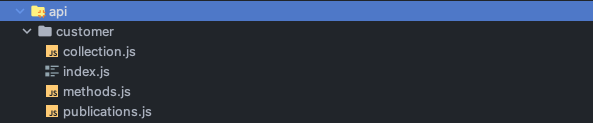
这将有以下代码:
¥That will have the following code:
collection.js
js
import { Mongo } from 'meteor/mongo';

export const CustomerCollection = new Mongo.Collection('customer');
methods.js
js
import { Meteor } from 'meteor/meteor';
import { check } from 'meteor/check';
import { CustomerCollection } from './collection';

export async function create(data) {
  return CustomerCollection.insertAsync({ ...data });
}

export async function update(_id, data) {
  check(_id, String);
  return CustomerCollection.updateAsync(_id, { ...data });
}

export async function remove(_id) {
  check(_id, String);
  return CustomerCollection.removeAsync(_id);
}

export async function findById(_id) {
  check(_id, String);
  return CustomerCollection.findOneAsync(_id);
}

Meteor.methods({
  'Customer.create': create,
  'Customer.update': update,
  'Customer.remove': remove,
  'Customer.find': findById
});
publication.js
js
import { Meteor } from 'meteor/meteor';
import { CustomerCollection } from './collection';

Meteor.publish('allCustomers', function publishCustomers() {
  return CustomerCollection.find({});
});
index.js
js
export * from './collection';
export * from './methods';
export * from './publications';
path 选项
¥path option
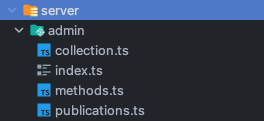
如果你希望将生成的文件放置在特定目录中,可以使用 --path 选项告诉 meteor generate 将新文件放置在何处。在下面的示例中,meteor generate 将创建一个名为 another-customer 的集合,并将 collection.ts、methods.ts、publications.ts 和 index.ts 文件放置在 server/admin 目录中。在本例中,我们假设用户的项目文件夹中有一个 tsconfig.json 文件,并改为生成 TypeScript。
¥If you want the generated files to be placed in a specific directory, you can use the --path option to tell meteor generate where to place the new files. In the example below, meteor generate will create a collection called another-customer and place the collection.ts, methods.ts, publications.ts and index.ts files inside the server/admin directory. In this example, we will assume the user has a tsconfig.json file in their project folder, and generate TypeScript instead.
bash
meteor generate another-customer --path=server/admin它将在 server/admin 文件夹中生成我们的文件:
¥It will generate our files in the server/admin folder:
collection.ts
typescript
import { Mongo } from 'meteor/mongo';

export type AnotherCustomer = {
  _id?: string;
  name: string;
  createdAt: Date;
}

export const AnotherCustomerCollection = new Mongo.Collection<AnotherCustomer>('another-customer');
methods.ts
typescript
import { Meteor } from 'meteor/meteor';
import { Mongo } from 'meteor/mongo';
import { check } from 'meteor/check';
import { AnotherCustomer, AnotherCustomerCollection } from './collection';

export async function create(data: AnotherCustomer) {
  return AnotherCustomerCollection.insertAsync({ ...data });
}

export async function update(_id: string, data: Mongo.Modifier<AnotherCustomer>) {
  check(_id, String);
  return AnotherCustomerCollection.updateAsync(_id, { ...data });
}

export async function remove(_id: string) {
  check(_id, String);
  return AnotherCustomerCollection.removeAsync(_id);
}

export async function findById(_id: string) {
  check(_id, String);
  return AnotherCustomerCollection.findOneAsync(_id);
}

Meteor.methods({
  'AnotherCustomer.create': create,
  'AnotherCustomer.update': update,
  'AnotherCustomer.remove': remove,
  'AnotherCustomer.find': findById
});
publications.ts
typescript
import { Meteor } from 'meteor/meteor';
import { AnotherCustomerCollection } from './collection';

Meteor.publish('allAnotherCustomers', function publishAnotherCustomers() {
  return AnotherCustomerCollection.find({});
});
index.ts
typescript
export * from './collection';
export * from './methods';
export * from './publications';
使用向导
¥Using the Wizard
不带参数运行 meteor-generate 将在终端中启动一个小向导,它会询问你集合的名称,以及是否也希望生成方法和发布物。
¥Running meteor-generate without arguments will start a little wizard in your terminal, which will ask you the name of your Collection, and whether you want Methods and Publications to be generated as well.
bash
meteor generate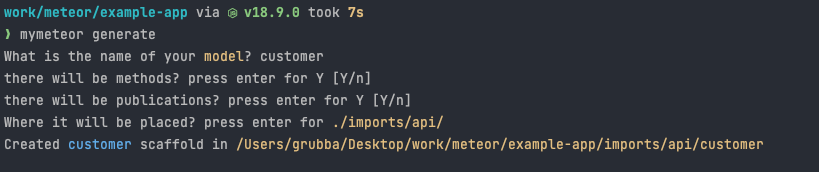
使用你自己的模板
¥Using your own template
你可以通过提供带有 "template" 的目录来自定义 meteor generate 的输出。模板目录只是一个由你提供的文件夹,其中包含 .js/.ts 文件,这些文件会被复制过来。
¥You may customize the output of meteor generate by providing a directory with a "template". A template directory is just a folder provide by you with .js/.ts files, which are copied over.
要使用用户提供的模板,你应该传入模板目录 URL,以便它可以复制其更改。
¥To use an user-provided template, you should pass in a template directory URL so that it can copy it with its changes.
--templatePath
bash
meteor generate feed --templatePath=/scaffolds-ts
请注意,这不是 Meteor 内部功能齐全的 CLI 框架。
meteor generate只是一个用于生成 Meteor 项目中常用代码的命令。查看 Yargs、Inquirer 或 Commander 以获取有关 CLI 框架的更多信息。¥Note that this is not a full-blown CLI framework inside Meteor.
meteor generateis just a command for generating code that is common in Meteor projects. Check out Yargs, Inquirer or Commander for more information about CLI frameworks.
如何重命名?
¥How to rename things?
除了你自己的模板文件夹外,你还可以将 JavaScript 文件传递给 meteor-generate,以便在模板文件中执行某些转换。该文件只是一个普通的 .js 文件,应该导出两个函数:transformName 和 transformContents 分别用于修改文件名和内容。
¥In addition to your own template folder, you can pass a JavaScript file to meteor-generate to perform certain transformations in your template files. That file is just a normal .js file that should export two functions: transformName and transformContents, which are used to modify the file names and contents, respectively.
如果你不想自己编写这样的文件,可以使用一些现成的函数来替换模板文件中的字符串,例如 $$name$$、$$PascalName$$ 和 $$camelName$$。内部 Meteor 模板文件(当你不通过 --templatePath 选项传递模板文件夹时使用)的实现方式如下 - 它们包含一些特殊字符串,这些字符串会在生成文件时被替换。
¥If you don't want to write such a file yourself, a few functions are provided out of the box to replace strings like $$name$$, $$PascalName$$ and $$camelName$$ in your template files. The internal Meteor template files (which is used when you don't pass a template folder through the --templatePath option) are implemented this way - they include those special strings which get replaced to generate your files.
这些替换来自 Meteor CLI 的这个函数:
¥These replacements come from this function from Meteor's CLI:
scaffoldName 是一个字符串,其中包含你作为参数传递的名称。
¥scaffoldName is a string with the name that you have passed as argument.
js
const transformName = (name) => {
    return name.replace(/\$\$name\$\$|\$\$PascalName\$\$|\$\$camelName\$\$/g, function (substring, args) {
      if (substring === '$$name$$') return scaffoldName;
      if (substring === '$$PascalName$$') return toPascalCase(scaffoldName);
      if (substring === '$$camelName$$') return toCamelCase(scaffoldName);
    })
  }
如何在你自己的模板中替换内容?
¥How to replace things in your own templates?
--replaceFn
如果你确实想要自定义模板的生成方式,你可以如上所述,使用 --replaceFn 选项传递 .js 文件。当你传入一个包含这两个函数实现的 .js 文件时,Meteor 将使用你的函数而不是 默认更改。
¥If you do want to customize how your templates are generated, you can pass a .js file with the --replaceFn option, as described above. When you pass in given a .js file with an implementation for those two functions, Meteor will use your functions instead of the default ones.
替换文件示例
¥example of a replacer file
js
export function transformFilename(scaffoldName, filename) {
  console.log(scaffoldName, filename);
  return filename;
}

export function transformContents(scaffoldName, fileContents, filename) {
  console.log(filename, fileContents);
  return contents;
}
如果你像这样运行命令:
¥If you run your command like this:
bash
meteor generate feed --replaceFn=/fn/replace.js它将使用 Meteor 提供的模板生成包含 $$PascalCase$$ 字符串的文件,忽略用户提供的名称 (feed)。由于我们在上面的示例中没有用任何东西替换它们,因此 Meteor 模板文件会被复制到 原样。
¥It will generate files full of $$PascalCase$$ strings using the Meteor provided templates, ignoring the name provided by the user (feed). Since we aren't replacing them with anything in the example above, the Meteor template files are copied as they are.
此功能的更实际用法可以使用以下 .js 文件完成:
¥A more real-world usage of this feature could be done with the following .js file:
js
const toPascalCase = (str) => {
  if(!str.includes('-')) return str.charAt(0).toUpperCase() + str.slice(1);
  else return str.split('-').map(toPascalCase).join('');
}
const toCamelCase = (str) => {
  if(!str.includes('-')) return str.charAt(0).toLowerCase() + str.slice(1);
  else return str.split('-').map(toPascalCase).join('');
}

const transformName = (scaffoldName, str) => {
    return str.replace(/\$\$name\$\$|\$\$PascalName\$\$|\$\$camelName\$\$/g, function (substring, args) {
      if (substring === '$$name$$') return scaffoldName;
      if (substring === '$$PascalName$$') return toPascalCase(scaffoldName);
      if (substring === '$$camelName$$') return toCamelCase(scaffoldName);
    })

}

export function transformFilename(scaffoldName, filename) {
  return transformName(scaffoldName, filename);
}

export function transformContents(scaffoldName, contents, fileName) {
  return transformName(scaffoldName, contents);
}
meteor 登录
¥meteor login
登录你的 Meteor 开发者账户。
¥Logs you in to your Meteor developer account.
用法:
¥Usage:
bash
meteor login [--email]详细信息:
¥Details:
提示输入你的用户名和密码
¥Prompts for your username and password
输入
--email即可通过电子邮件地址而非用户名登录¥Pass
--emailto log in by email address rather than by username你可以在
meteor login之前设置METEOR_SESSION_FILE=token.json以生成登录会话令牌,从而避免与第三方服务提供商共享凭据。¥You can set
METEOR_SESSION_FILE=token.jsonbeforemeteor loginto generate a login session token, avoiding the need to share credentials with third-party service providers
meteor 注销
¥meteor logout
将你从 Meteor 开发者账户中注销。
¥Logs you out of your Meteor developer account.
用法:
¥Usage:
bash
meteor logoutmeteor whoami
显示你当前登录的用户名。
¥Displays your currently logged-in username.
用法:
¥Usage:
bash
meteor whoamimeteor 部署站点
¥meteor deploy site
将当前目录中的项目部署到 Galaxy。
¥Deploys the project in your current directory to Galaxy.
基本部署
¥Basic Deployment
bash
meteor deploy your-app.meteorapp.com部署选项
¥Deployment Options
| 选项 | 描述 |
|---|---|
--delete, -D | 永久删除此部署 |
--debug | 在调试模式下部署(不压缩等) |
--settings, -s <file> | 设置 Meteor.settings 的可选数据 |
--free | 部署为免费应用(有限制) |
--mongo | 创建并连接到一个免费的共享 MongoDB 数据库 |
--plan <plan> | 设置应用计划:professional、essentials 或 free |
--container-size <size> | 设置容器大小:tiny、compact、standard、double、quad、octa 或 dozen |
--owner | 指定要部署到的组织或用户账户 |
--cache-build | 如果 git 提交哈希相同,则重用构建版本 |
--allow-incompatible-update | 允许将软件包升级或降级到可能不兼容的版本 |
--deploy-polling-timeout <ms> | 等待构建/部署的时间(默认为 15 分钟) |
--no-wait | 代码上传后退出,而不是等待部署完成 |
免费部署
¥Free Deployment
使用 MongoDB 部署免费应用:
¥Deploy a free app with MongoDB using:
bash
meteor deploy your-app.meteorapp.com --free --mongo快速入门
--free 和 --mongo 的组合是部署应用的最快方式,无需任何额外配置。
¥The combination of --free and --mongo is the fastest way to deploy an app without any additional configuration.
免费应用限制
¥Free App Limitations
域:必须使用 Meteor 域(
.meteorapp.com、.au.meteorapp.com或.eu.meteorapp.com)¥Domain: Must use a Meteor domain (
.meteorapp.com,.au.meteorapp.com, or.eu.meteorapp.com)冷启动:应用在 30 分钟不活动后停止,并在下次连接时重新启动
¥Cold Start: App stops after 30 minutes of inactivity and restarts on next connection
资源:仅限于一个 Tiny 容器(不建议在生产环境中使用)
¥Resources: Limited to one Tiny container (not recommended for production use)
MongoDB 选项
¥MongoDB Options
共享 MongoDB(免费)
¥Shared MongoDB (Free)
--mongo 选项会在 Galaxy 的共享集群中创建一个数据库:
¥The --mongo option creates a database in Galaxy's shared cluster:
首次部署时,你将在控制台中收到 MongoDB URI。
¥On first deploy, you'll receive your MongoDB URI in the console
URI 也会在 Galaxy 中应用的版本详细信息中显示
¥The URI is also visible in your app's version details in Galaxy
你必须至少创建一个文档才能完全实例化数据库。
¥You must create at least one document to fully instantiate the database
可以使用任何 MongoDB 客户端通过提供的 URI 访问数据库。
¥The database can be accessed using any MongoDB client with the provided URI
警告
不建议将免费共享 MongoDB 用于生产环境。共享集群不提供备份或恢复资源。
¥Free shared MongoDB is not recommended for production applications. The shared cluster doesn't provide backups or restoration resources.
MongoDB 连接设置
¥MongoDB Connection Settings
使用你自己的设置连接到免费的 MongoDB 共享集群时,请包含:
¥When connecting to the free MongoDB shared cluster using your own settings, include:
json
{
  "packages": {
    "mongo": {
      "options": {
        "tlsAllowInvalidCertificates": true
      }
    }
  }
}
为什么需要这个?
这是必要的,因为数据库提供商并非在每台机器上都安装了证书。关于此选项 此处 的更多信息。
¥This is necessary because the database provider doesn't have certificates installed on every machine. More about this option here.
重要说明
¥Important Notes
除非明确更改,否则设置在部署之间持久化。
¥Settings persist between deployments unless explicitly changed
你的项目应该是一个 git 仓库(提交哈希用于跟踪代码更改)
¥Your project should be a git repository (commit hash is used to track code changes)
不建议将免费应用和 MongoDB 共享主机用于生产环境。
¥Free apps and MongoDB shared hosting are not recommended for production use
Meteor 软件保留停止或移除滥用免费计划的应用的权利。
¥Meteor Software reserves the right to stop or remove applications that abuse the free plan
版本兼容性
--free和--mongo选项是在 Meteor 2.0 中引入的¥
--freeand--mongooptions were introduced in Meteor 2.0--plan选项在 Meteor 2.1 中引入¥
--planoption was introduced in Meteor 2.1--container-size选项在 Meteor 2.4.1 中引入¥
--container-sizeoption was introduced in Meteor 2.4.1--cache-build选项自 Meteor 1.11 起可用¥
--cache-buildoption is available since Meteor 1.11
meteor 更新
¥meteor update
在保持兼容性的同时更新你的 Meteor 应用。
¥Updates your Meteor application while maintaining compatibility.
用法:
¥Usage:
bash
meteor update
meteor update --patch
meteor update --release <release>
meteor update --packages-only
meteor update [packageName packageName2 ...]
meteor update --all-packages
更新类型:
¥Update Types:
| 命令 | 描述 |
|---|---|
meteor update | 更新 Meteor 版本和兼容软件包版本 |
meteor update --patch | 更新到最新的补丁版本(建议用于修复错误) |
meteor update --release <release> | 更新到特定的 Meteor 版本 |
meteor update --packages-only | 仅更新软件包,不更新 Meteor 版本 |
meteor update [packageName ...] | 更新指定命名的软件包 |
meteor update --all-packages | 更新所有软件包,包括间接依赖 |
重要提示:
¥Important Notes:
每个项目都固定到特定的 Meteor 版本
¥Every project is pinned to a specific Meteor release
默认情况下,更新不会破坏包之间的兼容性
¥By default, updates will not break compatibility between packages
补丁版本包含一些次要的关键错误修复,强烈建议使用。
¥Patch releases contain minor, critical bug fixes and are highly recommended
--release标志可以覆盖兼容性检查(可能导致警告)¥The
--releaseflag can override compatibility checks (may cause warnings)--all-packages选项会将所有软件包更新到其最新兼容版本,并遵循依赖约束。¥The
--all-packagesoption will update all packages to their latest compatible versions, respecting dependency constraints
meteor 添加软件包
¥meteor add package
将软件包添加到你的 Meteor 项目。
¥Adds packages to your Meteor project.
用法:
¥Usage:
bash
meteor add [package1] [package2] ...
meteor add package@version
版本约束:
¥Version Constraints:
package@1.1.0- 版本 1.1.0 或更高版本(但不包括 2.0.0 及以上版本)¥
package@1.1.0- Version 1.1.0 or higher (but not 2.0.0+)package@=1.1.0- 版本 1.1.0¥
package@=1.1.0- Exactly version 1.1.0package@=1.0.0 || =2.0.1- 版本 1.0.0 或 2.0.1 均可¥
package@=1.0.0 || =2.0.1- Either version 1.0.0 or 2.0.1 exactly
备注:
¥Notes:
按照惯例,社区包包含维护者的名称(例如
iron:router)。¥By convention, community packages include the maintainer's name (e.g.,
iron:router)要移除版本约束,请在不指定版本的情况下运行
meteor add package¥To remove a version constraint, run
meteor add packagewithout specifying a version
meteor 删除软件包
¥meteor remove package
删除之前添加到 Meteor 项目的包。
¥Removes a package previously added to your Meteor project.
用法:
¥Usage:
bash
meteor remove [package1] [package2] ...备注:
¥Notes:
要查看当前使用的软件包的列表,请运行
meteor list¥For a list of currently used packages, run
meteor list这将完全删除该软件包(如果仅删除版本限制,请使用
meteor add)¥This removes the package entirely (to only remove version constraints, use
meteor add)传递依赖不会自动降级,除非必要。
¥Transitive dependencies aren't automatically downgraded unless necessary
meteor 列表
¥meteor list
列出添加到项目的所有软件包,包括版本和可用更新。
¥Lists all packages added to your project, including versions and available updates.
用法:
¥Usage:
bash
meteor list [flags]标志:
¥Flags:
| 标志 | 描述 |
|---|---|
--tree | 输出显示软件包引用层次结构的树 |
--json | 输出软件包引用的非格式化 JSON 字符串 |
--weak | 显示弱引用依赖(仅限 --tree 或 --json) |
--details | 添加更多软件包详细信息(仅限 --json) |
meteor 添加平台平台
¥meteor add-platform platform
将平台添加到你的 Meteor 项目。
¥Adds platforms to your Meteor project.
用法:
¥Usage:
bash
meteor add-platform [platform1] [platform2] ...备注:
¥Notes:
可以使用一个命令添加多个平台
¥Multiple platforms can be added with one command
添加后,使用
meteor run <platform>在该平台上运行¥After adding, use
meteor run <platform>to run on that platform使用
meteor build为所有添加的平台构建¥Use
meteor buildto build for all added platforms
meteor 删除平台平台
¥meteor remove-platform platform
删除先前添加的平台。
¥Removes a previously added platform.
用法:
¥Usage:
bash
meteor remove-platform [platform]备注:
¥Notes:
要查看当前已添加平台的列表,请使用
meteor list-platforms¥For a list of currently added platforms, use
meteor list-platforms
meteor 列表平台
¥meteor list-platforms
列出明确添加到项目的所有平台。
¥Lists all platforms explicitly added to your project.
用法:
¥Usage:
bash
meteor list-platformsmeteor 确保 cordova 依赖
¥meteor ensure-cordova-dependencies
检查依赖是否已安装,并在必要时进行安装。
¥Checks if dependencies are installed, and installs them if necessary.
用法:
¥Usage:
bash
meteor ensure-cordova-dependenciesmeteor mongo
在本地开发数据库上打开 MongoDB shell。
¥Opens a MongoDB shell on your local development database.
用法:
¥Usage:
bash
meteor mongo警告
目前,你必须已经使用 meteor run 在本地运行应用。这在将来会更容易。
¥For now, you must already have your application running locally with meteor run. This will be easier in the future.
meteor reset
将当前项目重置为全新状态并清除本地缓存。
¥Resets the current project to a fresh state and clears the local cache.
用法:
¥Usage:
bash
meteor reset [--db]标志:
¥Flags:
--db- 同时删除本地 MongoDB 数据库¥
--db- Also removes the local MongoDB database
警告
用 --db 标志重置会删除你的数据!通过运行 meteor mongo,确保你在本地 mongo 数据库中没有任何你关心的信息。从 mongo shell 中,使用 show collections 和 db.<collection>.find() 检查你的数据。
¥Reset with --db flag deletes your data! Make sure you do not have any information you care about in your local mongo database by running meteor mongo. From the mongo shell, use show collections and db.<collection>.find() to inspect your data.
警告
目前,你无法在开发服务器运行时运行此方法。在运行此操作之前退出所有正在运行的 Meteor 应用。
¥For now, you cannot run this while a development server is running. Quit all running meteor applications before running this.
meteor build
打包项目以进行部署。
¥Package your project for deployment.
bash
meteor build <output-path> [options]输出工件
¥Output Artifacts
该命令为项目中的所有平台生成可部署的工件:
¥The command produces deployment-ready artifacts for all platforms in your project:
服务器包:包含运行应用服务器所需一切的 tarball
¥Server Bundle: A tarball containing everything needed to run the application server
Android 软件包:AAB/APK 打包文件和 Android 项目源代码(如果添加了 Android 平台)
¥Android Package: AAB/APK bundle and Android project source (if Android platform is added)
iOS 软件包:Xcode 项目源代码(如果添加了 iOS 平台)
¥iOS Package: Xcode project source (if iOS platform is added)
自托管
你可以使用服务器软件包在你自己的基础架构(而不是 Galaxy)上托管 Meteor 应用。请注意,你需要自行处理日志记录、监控、备份和负载均衡。
¥You can use the server bundle to host a Meteor application on your own infrastructure instead of Galaxy. Note that you'll need to handle logging, monitoring, backups, and load-balancing yourself.
选项
¥Options
| 选项 | 描述 |
|---|---|
--debug | 在调试模式下构建(不压缩,保留源码映射) |
--directory | 输出目录而非 tarball(现有输出位置将被首先删除) |
--server-only | 跳过移动应用的构建,但仍需构建 'web.cordova' 客户端目标以实现热代码推送 |
--mobile-settings <file> | 设置移动应用中 Meteor.settings 的初始值 |
--server <url> | 移动构建连接到 Meteor 服务器的位置(默认为 localhost:3000) |
--architecture <arch> | 针对与开发机器不同的架构进行构建 |
--allow-incompatible-update | 允许将软件包升级/降级到可能不兼容的版本 |
--platforms <platforms> | 仅针对指定平台构建(如果可用) |
--packageType <type> | Android 版本可选择 apk 或 bundle(默认为 bundle) |
可用架构
有效的架构包括:
¥Valid architectures include:
os.osx.x86_64os.linux.x86_64os.linux.x86_32os.windows.x86_32os.windows.x86_64
此选项选择依赖于二进制文件的 Atmosphere 包的架构。如果你的项目不使用带有二进制依赖的 Atmosphere 软件包,则 --architecture 将不起作用。
¥This option selects the architecture of binary-dependent Atmosphere packages. If your project doesn't use Atmosphere packages with binary dependencies, --architecture has no effect.
示例
¥Examples
bash
# Basic build
meteor build ../build

# Output a directory instead of a tarball
meteor build ../build --directory

# Debug build (unminified)
meteor build ../build --debug

# Build only the server (skip mobile apps)
meteor build ../build --server-only

# Build for specific platforms
meteor build ../build --platforms=android,ios

# Set server location for mobile apps
meteor build ../build --server=https://example.com:443

# Build for a different architecture
meteor build ../build --architecture=os.linux.x86_64

# Specify Android package type
meteor build ../build --packageType=apk
meteor lint
在你的 Meteor 应用代码上运行 linters。
¥Run linters on your Meteor application code.
bash
meteor lint [options]描述
¥Description
此命令:
¥This command:
执行应用的完整构建
¥Performs a complete build of your application
运行所有已配置的 linters
¥Runs all configured linters
将构建错误和 linting 警告输出到标准输出
¥Outputs build errors and linting warnings to standard output
CI 集成
meteor lint 命令在持续集成环境中尤其有用,可以在部署前捕获代码质量问题。
¥The meteor lint command is particularly useful for continuous integration environments to catch code quality issues before deployment.
选项
¥Options
| 选项 | 描述 |
|---|---|
--allow-incompatible-update | 如果需要满足所有软件包版本约束,允许将软件包升级或降级到可能不兼容的版本 |
示例用法
¥Example Usage
bash
# Basic usage
meteor lint

# Allow incompatible package updates during linting
meteor lint --allow-incompatible-update
警告
Linting 错误将导致你的应用无法成功构建。部署需要修复这些错误。
¥Linting errors will prevent your application from being built successfully. Fixing these errors is required for deployment.
meteor search
搜索 Meteor 软件包和版本。
¥Search for Meteor packages and releases.
bash
meteor search <regex> [options]描述
¥Description
在 Meteor 软件包和版本数据库中搜索名称与指定正则表达式匹配的项目。
¥Searches through the Meteor package and release database for items whose names match the specified regular expression.
默认行为
默认情况下,搜索不会显示:
¥By default, the search will not show:
没有官方版本的软件包(例如,只有预发布版本的软件包)
¥Packages without official versions (e.g., those with only prereleases)
已知由于迁移问题与 Meteor 0.9.0 及更高版本不兼容的软件包
¥Packages known to be incompatible with Meteor 0.9.0 and later due to migration issues
选项
¥Options
| 选项 | 描述 |
|---|---|
--maintainer <username> | 按授权维护者筛选结果 |
--show-all | 显示所有匹配项,包括预发布版本和不兼容的软件包 |
--ejson | 以 EJSON 格式显示更详细的输出 |
示例
¥Examples
bash
# Search for all packages related to "auth"
meteor search auth

# Search for packages maintained by a specific user
meteor search mongo --maintainer meteor

# Show all matching packages, including prereleases
meteor search bootstrap --show-all

# Get detailed output in EJSON format
meteor search react --ejson
高级搜索
你可以使用正则表达式进行更强大的搜索:
¥You can use regular expressions for more powerful searches:
bash
# Packages that start with "react-"
meteor search "^react-"

# Packages that end with "router"
meteor search "router$"
meteor show
显示有关软件包和发布版本的详细信息。
¥Display detailed information about packages and releases.
bash
meteor show <name> [options]
meteor show <name@version> [options]
meteor show [options]
描述
¥Description
显示特定软件包或版本的详细信息,包括:
¥Shows detailed information about a specific package or release, including:
名称和摘要
¥Name and summary
可用版本
¥Available versions
维护者
¥Maintainers
主页和 git URL(如果指定)
¥Homepage and git URL (if specified)
导出和其他包元数据
¥Exports and other package metadata
提示
这适用于从源代码构建的本地软件包和存储在服务器上的远程软件包。
¥This works on both local packages built from source and remote packages stored on the server.
常用用法
¥Common Usage
查看软件包信息
¥View Package Information
bash
# Show information about a package
meteor show jam:easy-schema

# Show information about a specific version
meteor show jam:easy-schema@1.7.0

# Show information about the local version
meteor show jam:easy-schema@local
查看 Meteor 版本
¥View Meteor Releases
bash
# Show recommended Meteor releases
meteor show METEOR

# Show all Meteor releases (including intermediate ones)
meteor show METEOR --show-all
选项
¥Options
| 选项 | 描述 |
|---|---|
--show-all | 显示隐藏版本、实验版本和不兼容的软件包 |
--ejson | 以 EJSON 格式显示更详细的输出 |
示例
¥Examples
bash
# Running from a package directory shows info for that package
cd ~/my-package
meteor show

# View detailed EJSON output
meteor show react-meteor-data --ejson
默认行为
默认情况下,Meteor:
¥By default, Meteor:
最多显示五个版本
¥Shows no more than five versions
隐藏实验版本版本
¥Hides experimental release versions
隐藏与 Meteor 0.9.0 及更高版本不兼容的软件包
¥Hides packages incompatible with Meteor 0.9.0 and later
版本选择
对于特定于版本的信息(例如导出),Meteor 将使用:
¥For version-specific information (like exports), Meteor will use:
本地版本(如果有)
¥The local version, if available
如果没有本地版本,则使用最新的官方版本
¥The latest official version, if no local version exists
meteor publish
将包发布到 Atmosphere(Meteor 包服务器)。
¥Publish a package to Atmosphere (Meteor package server).
bash
meteor publish [options]
meteor publish --update
描述
¥Description
将本地包的新版本发布到 Atmosphere。必须从包目录运行。
¥Publishes a new version of a local package to Atmosphere. Must be run from the package directory.
软件包命名约定
已发布的包名称必须以维护者的 Meteor 开发者账户用户名和冒号开头,例如 username:package-name。
¥Published package names must begin with the maintainer's Meteor Developer Account username and a colon, like username:package-name.
常用操作
¥Common Operations
发布新软件包
¥Publish a New Package
bash
cd my-package
meteor publish --create
更新现有软件包
¥Update an Existing Package
bash
cd my-package
meteor publish
更新软件包元数据
¥Update Package Metadata
在不更改代码的情况下更新 README、说明或其他元数据:
¥Update README, description, or other metadata without changing the code:
bash
cd my-package
meteor publish --update
选项
¥Options
| 选项 | 描述 |
|---|---|
--create | 首次发布一个新包 |
--update | 更新先前发布版本的元数据(README、git URL、说明等) |
--allow-incompatible-update | 允许将依赖升级/降级到可能不兼容的版本 |
--no-lint | 跳过发布前对软件包及其本地依赖进行 lint 操作 |
特定于架构的软件包
¥Architecture-Specific Packages
对于包含二进制组件的软件包:
¥For packages with binary components:
常规
publish版本将仅上传你当前架构的构建版本¥Regular
publishwill only upload the build for your current architecture从其他计算机使用
meteor publish-for-arch上传其他架构的构建¥Use
meteor publish-for-archfrom a different machine to upload builds for other architectures
软件包发布流程
发布软件包时:
¥When you publish a package:
Meteor 从
package.js读取版本信息¥Meteor reads version information from
package.js构建软件包
¥Builds the package
将源代码和构建版本发送到软件包服务器
¥Sends both source code and built version to the package server
将你标记为唯一维护者(使用
meteor admin maintainers进行修改)¥Marks you as the sole maintainer (use
meteor admin maintainersto modify)
示例
¥Examples
bash
# Publish a new package
meteor publish --create

# Update an existing package
meteor publish

# Update metadata only
meteor publish --update

# Publish without linting
meteor publish --no-lint
提示
使用 meteor show 预览你的软件包信息在软件包服务器中的显示方式。
¥Use meteor show to preview how your package information will appear in the package server.
meteor publish-for-arch
发布特定于架构的包版本。
¥Publish architecture-specific builds of a package.
bash
meteor publish-for-arch packageName@version描述
¥Description
创建并发布现有软件包版本的构建版本,使其与最初发布的版本架构不同。
¥Creates and publishes a build of an existing package version for a different architecture than the one initially published.
架构支持
Meteor 目前支持以下架构:
¥Meteor currently supports the following architectures:
32 位 Linux
¥32-bit Linux
64 位 Linux(由 Galaxy 服务器使用)
¥64-bit Linux (used by Galaxy servers)
64 位 macOS
¥64-bit macOS
用例
¥Use Case
当软件包包含特定于平台的组件(例如带有原生代码的 npm 模块)时,运行 meteor publish 只会为你当前的架构创建构建版本。为了使你的软件包在其他架构上运行,你需要在这些架构的机器上运行 publish-for-arch。
¥When a package contains platform-specific components (like npm modules with native code), running meteor publish only creates a build for your current architecture. To make your package usable on other architectures, you need to run publish-for-arch from machines with those architectures.
工作原理
¥How It Works
在目标架构的机器上运行该命令
¥Run the command on a machine with the target architecture
Meteor 会从软件包服务器下载软件包的源代码和依赖。
¥Meteor downloads your package's source and dependencies from the package server
为当前架构构建软件包
¥Builds the package for the current architecture
将特定于架构的构建上传到软件包服务器
¥Uploads the architecture-specific build to the package server
无需源代码
你无需拥有软件包源代码的副本即可运行此命令。Meteor 会自动从软件包服务器下载所需的所有内容。
¥You don't need to have a copy of your package's source code to run this command. Meteor automatically downloads everything needed from the package server.
示例工作流程
¥Example Workflow
假设你从 Mac 发布了包含二进制组件的软件包:
¥Imagine you've published a package with binary components from a Mac:
bash
# On your Mac
cd my-binary-package
meteor publish --create
为了方便 Linux 用户使用:
¥To make it available for Linux users:
bash
# Later, on a 64-bit Linux machine
meteor publish-for-arch username:my-binary-package@1.0.0
meteor publish-release
发布一个新的 Meteor 版本。
¥Publish a new Meteor release.
bash
meteor publish-release <path-to-json-config> [options]描述
¥Description
根据 JSON 配置文件发布一个新版本的 Meteor。这允许你创建自定义的 Meteor 版本或发布轨道。
¥Publishes a new release of Meteor based on a JSON configuration file. This allows you to create custom Meteor releases or release tracks.
发布轨道
Meteor 版本分为以下几个版本:
¥Meteor releases are divided into tracks:
只有 Meteor 软件可以发布到默认的 Meteor 轨道
¥Only Meteor Software can publish to the default Meteor track
任何人都可以创建并发布到自己的自定义轨道
¥Anyone can create and publish to their own custom tracks
除非指定,否则用户在运行
meteor update时不会切换轨道¥Users won't switch tracks when running
meteor updateunless specified
配置文件格式
¥Configuration File Format
JSON 配置文件必须包含:
¥The JSON configuration file must contain:
json
{
  "track": "TRACK_NAME",          // Release track (e.g., "METEOR")
  "version": "VERSION",           // Version number (e.g., "2.8.0")
  "recommended": true|false,      // Is this a recommended release?
  "description": "DESCRIPTION",   // Brief description of the release
  "tool": "PACKAGE@VERSION",      // The meteor tool package and version
  "packages": {                   // Specific package versions for this release
    "package1": "version",
    "package2": "version"
  },
  "patchFrom": ["VERSION1", "VERSION2"]  // Optional: releases this patches
}
先决条件
你必须先将所有软件包版本发布到软件包服务器,然后才能在发布版本中指定它们。
¥You must publish all package versions to the package server before you can specify them in a release.
选项
¥Options
| 选项 | 描述 |
|---|---|
--create-track | 创建并发布新的发布轨道 |
推荐标志
¥Recommended Flag
为稳定版本设置
recommended: true(例如,METEOR@3.2.2)¥Set
recommended: truefor stable releases (e.g., METEOR@3.2.2)为候选版本、实验版本等设置
recommended: false。¥Set
recommended: falsefor release candidates, experimental releases, etc.
补丁版本
¥Patch Releases
使用 patchFrom 字段指定补丁版本:
¥Use the patchFrom field to specify a patch release:
列出此新版本补丁的版本
¥Lists releases this new release patches
自动取消推荐
patchFrom中指定的版本¥Automatically unrecommends the releases specified in
patchFrom
示例
¥Examples
发布新版本轨道
¥Publishing a New Release Track
bash
meteor publish-release my-release-config.json --create-track发布新版本
¥Publishing a New Release
bash
meteor publish-release meteor-3.3.0.json示例配置文件
¥Sample Configuration File
json
{
  "track": "MYCORP",
  "version": "1.0.0",
  "recommended": true,
  "description": "MyCompany's custom Meteor release",
  "tool": "meteor-tool@2.8.0",
  "packages": {
    "accounts-base": "2.2.5",
    "mongo": "1.15.0"
  }
}
自定义工具分支
该系统允许将 Meteor 工具的分支发布为软件包,用户可以通过切换到相应的版本来切换到自定义工具实现。
¥This system allows forks of the meteor tool to be published as packages, letting users switch to custom tool implementations by changing to the corresponding release.
meteor test-packages
运行 Meteor 软件包的测试。
¥Run tests for Meteor packages.
bash
meteor test-packages [options] [package...]描述
¥Description
为一个或多个软件包运行单元测试。测试结果显示在浏览器仪表板中,每当相关源文件被修改时,仪表板都会更新。
¥Runs unit tests for one or more packages. Test results appear in a browser dashboard that updates whenever relevant source files are modified.
软件包规范
可以通过以下方式指定软件包:
¥Packages can be specified by:
名称:使用标准软件包搜索算法解析
¥Name: Resolved using the standard package search algorithm
路径:任何包含 '/' 的参数都从该目录路径加载
¥Path: Any argument containing a '/' is loaded from that directory path
如果未指定任何软件包,将测试所有可用的软件包。
¥If no packages are specified, all available packages will be tested.
选项
¥Options
| 选项 | 描述 |
|---|---|
--port, -p <port> | 监听端口(默认值:3000)。也使用端口 N+1 和 N+2 |
--open, -o | 应用启动时打开浏览器窗口 |
--inspect[-brk][=<port>] | 启用服务器端调试(默认端口:9229) |
--settings, -s <file> | 设置服务器上 Meteor.settings 的可选数据 |
--production | 模拟生产模式(压缩并打包 CSS、JS 文件) |
--driver-package <package> | 要使用的测试驱动程序包(例如 meteortesting:mocha) |
--filter, -f | 按名称筛选测试 |
--verbose | 打印所有构建日志的输出 |
--no-lint | 跳过每次测试应用重建时运行 lint 操作 |
--extra-packages <packages> | 使用其他软件包运行(以逗号分隔) |
--test-app-path <path> | 设置临时测试应用的目录(默认值:系统临时目录) |
移动测试选项
¥Mobile Testing Options
| 选项 | 描述 |
|---|---|
--ios, --android | 在模拟器中运行测试 |
--ios-device, --android-device | 在已连接的设备上运行测试 |
--mobile-server <url> | 移动构建的服务器位置(默认:本地 IP 和端口) |
--cordova-server-port <port> | Cordova 提供内容的本地端口 |
示例
¥Examples
按名称测试特定软件包
¥Test specific packages by name
bash
meteor test-packages accounts-base accounts-password按路径测试软件包
¥Test a package by path
bash
meteor test-packages ./packages/my-package使用自定义设置测试
¥Test with custom settings
bash
meteor test-packages --settings settings.json使用 Mocha 测试驱动程序测试
¥Test with Mocha test driver
bash
meteor test-packages --driver-package meteortesting:mocha使用过滤器测试
¥Test with filter
bash
meteor test-packages --filter myTestName或者,你可以使用 TINYTEST_FILTER 环境变量来过滤:
¥Alternatively, you can use the TINYTEST_FILTER environment variable to filter:
bash
TINYTEST_FILTER=myTestName meteor test-packages在移动设备上测试
¥Test on mobile device
bash
meteor test-packages --ios-devicemeteor admin
官方 Meteor 服务的管理命令。
¥Administrative commands for official Meteor services.
bash
meteor admin <command> [args]需要授权
这些命令需要授权才能使用。
¥These commands require authorization to use.
可用命令
¥Available Commands
| 命令 | 描述 |
|---|---|
maintainers | 查看或更改软件包维护者 |
recommend-release | 推荐使用之前发布的版本 |
change-homepage | 更改软件包的主页 URL |
list-organizations | 列出你所属的组织 |
members | 查看或更改组织成员 |
get-machine | 在 Meteor 构建场中打开一台机器的 SSH shell |
使用示例
¥Usage Examples
bash
# View or change package maintainers
meteor admin maintainers packagename [add/remove] [username]

# Change a package homepage
meteor admin change-homepage packagename [url]

# List your organizations
meteor admin list-organizations

# Manage organization members
meteor admin members organization-name [add/remove] [username]
详细帮助
有关任何管理命令的更多信息,请运行:
¥For more information on any admin command, run:
bash
meteor help admin <command>meteor shell
启动交互式 JavaScript shell 以评估服务器端代码。
¥Start an interactive JavaScript shell for evaluating server-side code.
bash
meteor shell描述
¥Description
meteor shell 命令连接到正在运行的 Meteor 服务器,并提供一个交互式 JavaScript REPL(读取-求值-打印循环)来执行服务器端代码。
¥The meteor shell command connects to a running Meteor server and provides an interactive JavaScript REPL (Read-Eval-Print Loop) for executing server-side code.
连接行为
需要在应用目录中运行 Meteor 服务器
¥Requires a running Meteor server in the application directory
如果没有可用的服务器,它将持续尝试连接,直到成功为止。
¥If no server is available, it will keep trying to connect until successful
多个 shell 可以同时连接到同一服务器
¥Multiple shells can be attached to the same server simultaneously
功能
¥Features
服务器集成
¥Server Integration
退出 shell 不会终止服务器
¥Exiting the shell does not terminate the server
如果服务器重新启动(由于代码更改或错误),shell 将自动随之重新启动。
¥If the server restarts (due to code changes or errors), the shell will automatically restart with it
你可以通过在 shell 中输入
.reload来手动触发重新加载。¥You can manually trigger a reload by typing
.reloadin the shell
开发者体验
¥Developer Experience
| 功能 | 描述 |
|---|---|
| Tab 键补全 | 内置 Tab 键补全全局变量,例如 Meteor、Mongo 和 Package |
| 持久化历史记录 | 命令历史记录在会话之间保留 |
| 命令调用 | 使用向上箭头键访问之前运行的命令 |
示例用法
¥Example Usage
bash
# Start a Meteor server in one terminal
meteor run

# Connect a shell in another terminal
meteor shell

# Now you can run server-side code interactively:
> Meteor.users.find().count()
> Package.mongo.Mongo.Collection.prototype
> Meteor.isServer
true
> .reload  # Manually restart the shell
高级示例
js
// Query the database
> db = Package.mongo.MongoInternals.defaultRemoteCollectionDriver().mongo.db
> db.collection('users').find().toArray()

// Access Meteor settings
> Meteor.settings.public

// Inspect publications
> Object.keys(Meteor.server.publish_handlers)
meteor npm
使用 Meteor 打包的 npm 版本运行 npm 命令。
¥Run npm commands using Meteor's bundled npm version.
bash
meteor npm <command> [args...]描述
¥Description
meteor npm 命令使用 Meteor 打包的版本执行 npm 命令。
¥The meteor npm command executes npm commands using the version bundled with Meteor itself.
使用 Meteor npm 的优势
确保与 Meteor 的 Node.js 版本兼容
¥Ensures compatibility with Meteor's Node.js version
对于具有原生依赖的软件包(如
bcrypt)至关重要¥Crucial for packages with native dependencies (like
bcrypt)无需单独安装 npm
¥No need to install npm separately
跨开发环境的行为一致
¥Consistent behavior across development environments
常用命令
¥Common Commands
| 命令 | 描述 |
|---|---|
meteor npm install | 安装 package.json 中列出的所有依赖 |
meteor npm install <package> --save | 安装并将软件包保存为依赖 |
meteor npm install <package> --save-dev | 安装并将软件包保存为开发依赖 |
meteor npm update | 将所有软件包更新至其最新允许版本 |
meteor npm ls | 列出已安装的软件包 |
meteor npm rebuild | 重新构建包含原生依赖的软件包 |
示例
¥Examples
bash
# Install a package and save to dependencies
meteor npm install lodash --save

# Install packages from package.json
meteor npm install

# Run an npm script defined in package.json
meteor npm run start

# View package information
meteor npm info react
原生依赖
在使用具有二进制依赖并进行原生 C 调用的软件包(例如 bcrypt)时,使用 meteor npm 而不是常规 npm 尤为重要。这确保它们使用与 Meteor 相同的库构建。
¥Using meteor npm instead of regular npm is especially important when working with packages that have binary dependencies making native C calls (like bcrypt). This ensures they're built with the same libraries used by Meteor.
meteor node
使用 Meteor 打包的 Node.js 版本运行 Node.js 命令。
¥Run Node.js commands using Meteor's bundled Node.js version.
bash
meteor node [options] [script.js] [arguments]替代方案
建议使用 meteor shell,它提供类似的功能,并支持访问 Meteor 应用的服务器上下文。
¥Consider using meteor shell instead, which provides similar functionality plus access to your Meteor application's server context.
描述
¥Description
meteor node 命令使用 Meteor 打包的版本运行 Node.js。
¥The meteor node command runs Node.js using the version bundled with Meteor itself.
常用用途
¥Common Uses
| 命令 | 描述 |
|---|---|
meteor node | 启动交互式 Node.js REPL |
meteor node script.js | 执行 JavaScript 文件 |
meteor node -e "<code>" | 执行一行 JavaScript 代码 |
meteor node --version | 显示 Node.js 版本 |
示例
¥Examples
bash
# Start an interactive REPL
meteor node

# Execute inline JavaScript
meteor node -e "console.log(process.versions)"

# Run a script with arguments
meteor node scripts/migrate.js --force

# Check installed Node.js version
meteor node --version
运行简单脚本
创建 hello.js:
¥Create hello.js:
js
console.log('Hello from Node.js version', process.version);
console.log('Arguments:', process.argv.slice(2));
运行:
¥Run it:
bash
meteor node hello.js arg1 arg2